hey everyone! as of tonight we’ve pushed an update that should fix autoplaying audio/video in all of the situations that it occurs, whether triggered by Anti-Capitalism, Blacklist, or another third-party tool. thanks for sticking with us while we trudge waist deep together through the mire of code that comprises Tumblr. trust me—this was truly a sticky bug to unravel.
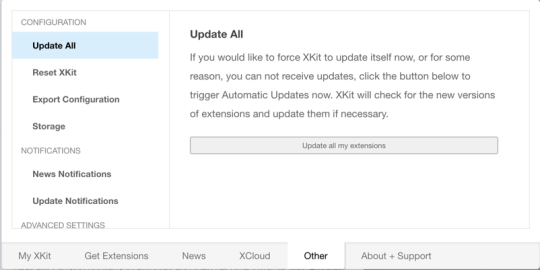
This update is part of XKit Patches version 6.4.0. You can update XKit Patches using the “Update All” button:
get at us with your feedback! we’re real humans with schedules and sleep cycles and occasionally jobs and stuff, but you can generally reach us in our ask box, our support blog, or our live support chat room. If nobody is online, you always can leave a message for us to read later.
Just a reminder because these posts are spreading farther then our usual audience: We’re a team of developers that run and maintain the New XKit project, a fork of XKit that was started after the original was abandoned in late 2014. New XKit is on version 7.7.1 (chrome, opera), 7.7.3 (firefox), or 7.7.2 (safari). Anything earlier then 7.6.x is old/original XKit, and you’ll need to disable it to install New XKit. (You can migrate your settings, but it’s a little involved—disable for now, and come ask us about it later)
some quick links for those of you who might not have New XKit already:
(quick plug again—If you’re interested in helping us run New XKit, for example by answering asks or helping other users with questions + problems, come stop by and introduce yourself! we don’t bite, we promise!)
fyi, because I just spent a few minutes working this out for myself: XKit Patches is an internal extension that runs on every copy of XKit. (That is, it’s not like Blacklist or Anticapitalism: it doesn’t normally appear in your list of extensions.) Nevertheless, never fear, it IS there and running. You can force it to update using the Update All button as described above.
If, like me, you want to see for yourself what rev of XKit Patches you’re currently running, you can go to the “Other” tab and turn on “Internals” (bottom of the sidebar), and that will make XKit Patches show up in your list of installed extensions on the “My XKit” tab.
…or, you know, you could just follow the directions above and hit Update All as directed, and trust the lovely people running New XKit.
ty yes i had the same initial impression until i saw the screenshot they were on a different bottom button.
YAY i hope this finally does it because it was really frustrating to be scrolled way down my dash and suddenly music starts and my only option was to just close the tab or turn off my sound entirely.
THANK YOU NEW XKIT!
Have they fixed the bug that made Hermes delete text on image posts yet? Cos I miss Hermes. Most of the time my dash sidebar still loads wrong, and idk if that’s a problem with Tumblr, or Xkit, but I’m sure Hermes made it better, before I had to uninstall it.

 suchasinistergame